The Complete Guide to AI-Powered Customer Feedback Theme Discovery
AI theme discovery processes thousands of feedback responses in minutes with 80%+ accuracy. This guide answers the six questions CX leaders ask most when evaluating AI theming solutions, with practical toolkits and Thematic customer examples.
AI theme discovery identifies feedback themes in minutes with 80%+ accuracy, matching or exceeding trained human coders who typically agree only 50-60% of the time
The difference between tools that drive decisions and tools that gather dust: transparency (can you see how themes are built?), control (can you customize?), and impact intelligence (can you connect themes to business outcomes?)
Prioritize by impact, not volume. A theme mentioned by 5% of customers might cost more NPS points than one mentioned by 25%
Thematic's transparent, research-grade AI theme discovery achieved 543% ROI over three years in the Forrester Total Economic Impact study
Includes practical toolkits: 10-question vendor evaluation checklist, theme taxonomy template, and the IST framework for prioritizing fixes
Executive summary
AI-powered theme discovery transforms how enterprise teams analyze customer feedback. Modern customer feedback analytics platforms with AI theming capabilities, like Thematic, identify themes in minutes with 80%+ accuracy out of the box, matching or exceeding trained human coders who typically achieve only 50-60% consistency with each other.
The difference between tools that drive decisions and tools that gather dust comes down to three factors:
Transparency (can you see how themes are built?),
Control (can you refine and customize?), and
Impact intelligence (can you connect themes to business outcomes?).
This guide answers the six questions CX and Insights leaders ask most when evaluating AI theming solutions:
How does AI identify themes in customer feedback?
How accurate is AI theme identification?
Can I customize AI-generated themes?
How does AI handle feedback that mentions multiple topics?
Can I track how customer feedback themes change over time?
How do I find the root cause of customer complaints?
You'll also find practical toolkits:
a vendor evaluation checklist with 10 questions and scoring guidance,
a theme taxonomy template,
the IST decision framework for prioritizing fixes, and
a volume vs. impact priority matrix.
Thematic's Forrester Total Economic Impact study found that customers using the platform's transparent, research-grade AI theme discovery achieved 543% ROI over three years, with payback in under 6 months.
This guide shows you how to evaluate solutions and build a business case for your leadership team.
Who this guide is for
Heads of Insights, Research, and Customer Intelligence at enterprise organizations who already have feedback collection systems (Medallia, Qualtrics, contact center platforms) but need a feedback intelligence layer to turn scattered feedback into decision-ready insights they can defend to executives.
How does AI identify themes in customer feedback?
AI theme discovery is the automated identification and categorization of recurring topics in unstructured customer feedback using machine learning and natural language processing.
Thematic's customer feedback analytics platform uses this AI theme discovery to process thousands of responses in minutes while maintaining consistency across your entire dataset.
It uses a combination of text analytics and large language models (LLMs) to read customer feedback, understand meaning, and group similar responses into themes automatically.
Unlike manual coding that takes weeks, Thematic's AI theme discovery processes thousands of responses in minutes while maintaining consistency across your entire dataset.
This capability sits on top of your existing feedback collection tools. You keep Medallia, Qualtrics, or your contact center platform for gathering feedback. The AI theming layer transforms that raw feedback into structured, actionable intelligence.
Semantic understanding vs. keyword matching
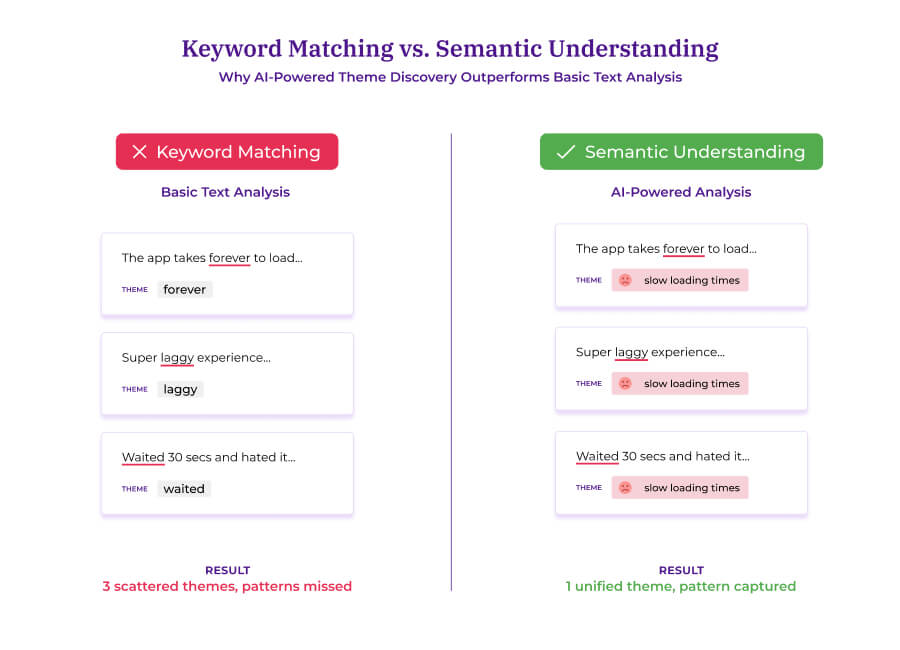
Basic text analysis counts words. If a customer writes "slow," it counts "slow." But customers rarely use identical language to describe identical problems.
Consider these three comments:
"The app takes forever to load."
"Super laggy experience."
"I waited 30 seconds just to see my dashboard."
All three describe the same issue. Keyword matching scatters them across different buckets or misses them entirely.
Semantic understanding solves this. AI trained on language patterns recognizes that "takes forever," "laggy," and "waited 30 seconds" share a common meaning. Thematic's AI groups them into a single theme like "slow loading times" automatically.
Semantic understanding groups related feedback by meaning, not just matching words.
This is the difference between knowing customers are unhappy and knowing what to fix. Sentiment analysis flags frustration, while theme discovery pinpoints the cause.
That "why" is what makes insights decision-ready for your executive team.
Why training data matters
AI models learn from examples. A model trained on news articles will struggle with your customers' informal, fragmented language. 'App crashes when I try to checkout!!!' doesn't follow newspaper grammar.
If you've ever seen an AI misclassify obvious feedback, training data is usually the culprit.
The best customer feedback analysis platforms train specifically on feedback sources: surveys, support tickets, reviews, and social comments.
Thematic combines traditional text analytics with LLMs, selecting the best approach for each task based on accuracy, speed, and cost. The platform continuously adopts the latest AI models while maintaining the transparency that research-grade analysis requires.
The critical role of transparency
Many AI platforms give you themes but can't explain why a specific comment was assigned to a specific theme. This creates problems when executives ask how you reached your conclusions.
Transparent platforms show their work.
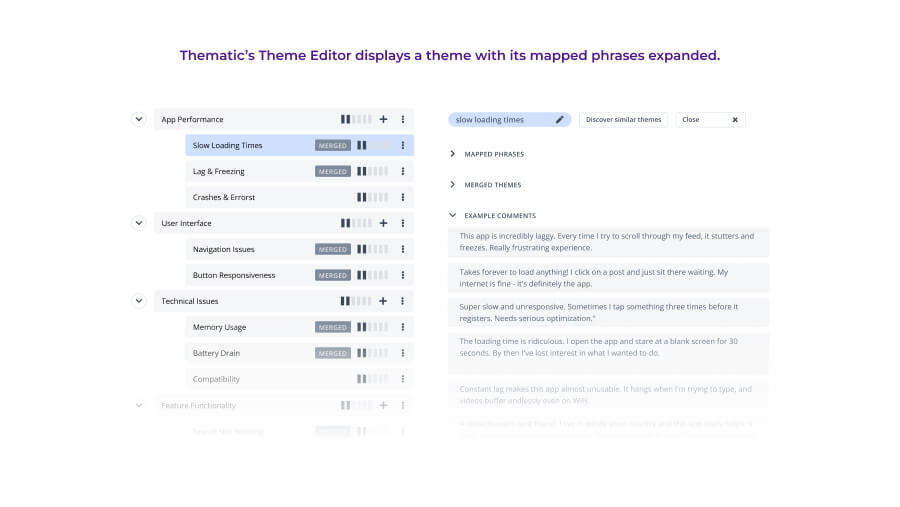
In Thematic, each theme includes mapped phrases: the specific words and expressions the AI associates with that theme. You see that "takes forever," "laggy," and "loading time" all map to "app performance."
Thematic's Theme Editor displays mapped phrases so you can see exactly why feedback was assigned to each theme.
This visibility lets you validate the AI's work and explain your methodology to stakeholders. When leadership asks "how do we know this is accurate?" you trace any insight back to specific customer comments.
This transparency is what makes Thematic's AI theme discovery research-grade and defensible.
How accurate is AI theme identification?
Modern AI theme discovery achieves 80%+ accuracy out of the box, matching or exceeding trained human coders. With refinement, accuracy reaches 90% or higher.
The key differentiator is transparency: Thematic shows exactly why each piece of feedback was assigned to a theme, making validation and executive presentation straightforward.
What "accuracy" actually means
In theme identification, there's no single "correct" answer. Give five analysts the same 100 comments, and they'll create different theme structures with different assignments.
Academics measure this using something called inter-rater reliability. In plain terms, it's how often different people agree when categorizing the same content. If two analysts look at the same comment, do they put it in the same bucket?
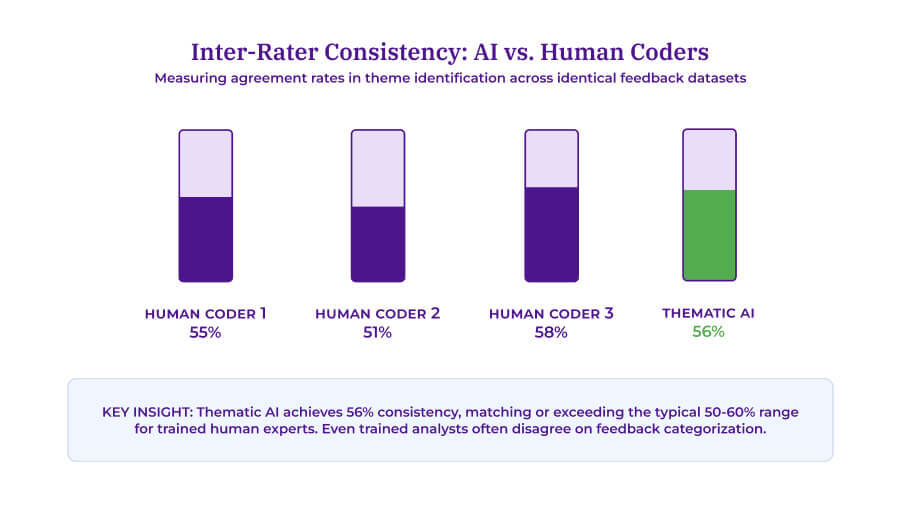
According to Thematic's research on AI accuracy, trained human experts typically agree only 50-60% of the time. Even trained analysts often disagree on how to categorize the same piece of feedback.
The same research found that Thematic's AI matches or exceeds human consistency. In controlled tests, Thematic agreed with human coders more often than the humans agreed with each other. After 30 minutes of configuration, Thematic's consistency reached 60-65%, outperforming the human average.
Realistic benchmarks
When evaluating AI theming solutions, here's what realistic accuracy looks like:
80%+ accuracy out of the box: No training required. Upload your data and get usable themes immediately.
90%+ accuracy with refinement: A few hours of human review and theme adjustment pushes accuracy higher than most manual coding.
100% accuracy is a myth: Even humans don't achieve this. Any vendor claiming 100% accuracy isn't being honest about how feedback analysis works.
Thematic AI achieves 56% consistency, matching the typical range for trained human coders who often disagree on feedback categorization.
Why black-box AI fails enterprise requirements
Some vendors can't explain how their AI reaches conclusions. This makes validation impossible and creates real problems when you present to executives.
With black-box tools, you can't trace your steps when leadership asks tough questions. You end up saying "the AI told us" without evidence to support your recommendations.
For Insights teams who need to defend their analysis to the C-suite, this is a dealbreaker.
Transparent platforms let you click on any theme and see the exact comments and phrases that support it. This transparency isn't optional for enterprise deployment. It's how you build confidence that your customer intelligence is reliable enough to drive decisions.
The Forrester Total Economic Impact study found that companies using Thematic achieved 543% ROI over 3 years and $2.9 million in total benefits.
A big reason: Teams actually trusted and acted on the insights rather than letting them sit in reports.
Toolkit: Accuracy validation checklist
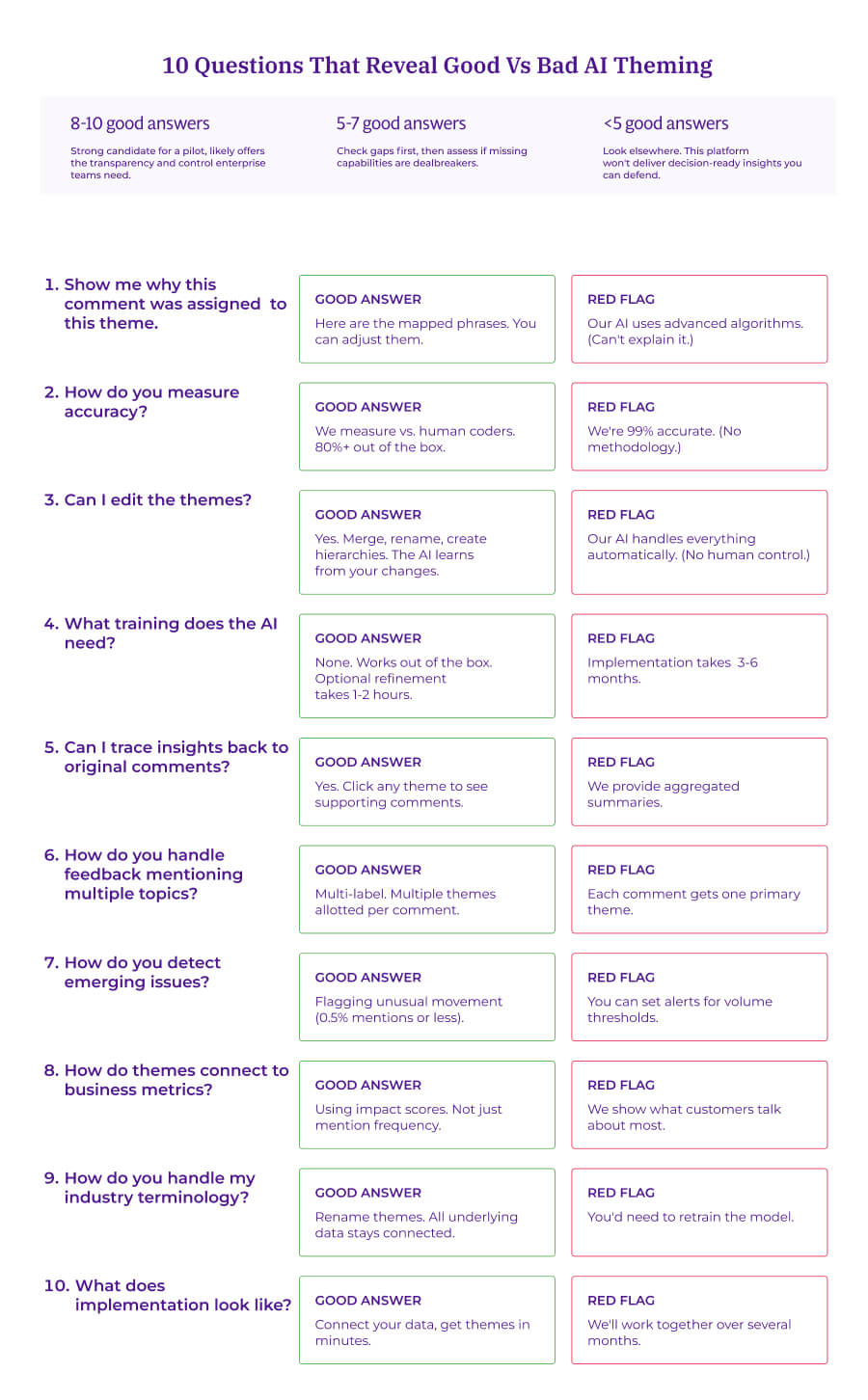
Use these 10 questions when evaluating AI feedback theming vendors. The answers reveal whether a platform delivers decision-ready insights you can defend to executives.
When evaluating AI feedback theming vendors, focus on ten critical capabilities:
Transparency — Can you see how themes are built?
Accuracy measurement — Is there a clear methodology?
Customization — Can you refine without starting over?
Training requirements — How fast is setup?
Traceability — Can insights link back to original comments?
Multi-label handling — Does it capture all topics in complex feedback?
Emerging issue detection — Does it catch problems early?
Metric connection — Does it show business impact, not just volume?
Terminology flexibility — Can you rename themes without retraining?
Implementation speed — Days or months?
Use this checklist in your next vendor demo. Print it, bring it to the meeting, and score responses in real time.
Case study deep-dive: LendingTree
The challenge LendingTree needed to analyze over 20,000 comments across 7 product verticals every 90 days. Their product teams needed insights, but they couldn't wait weeks for research to deliver analysis.
The platforms they'd tried before either required extensive training or produced black-box results that nobody trusted.
Why they chose Thematic The AI shows its work. Every theme traces back to specific comments. It works immediately without a training period. And product teams can explore themes relevant to their own areas independently.
What they discovered Because the AI was transparent, product teams could trust the insights without needing analyst validation for every single question. They found that acquisition costs were a major barrier to market growth. And with clear evidence in hand, they aligned on solutions fast.
The results 20,000+ comments processed with zero setup time Product teams got self-service access to insights Acquisition cost improvements through faster insight-to-action cycles Hundreds of hours saved that used to go into data prep
"Thematic works straight out of the box." — Lee King, Head of Insights, LendingTree
Can I customize AI-generated themes?
Yes, and this is where most customer feedback analytics platforms fall short. With Thematic's Theme Editor, you can merge, rename, and restructure AI-generated themes to match your business terminology without sacrificing accuracy.
The key is human-in-the-loop control. You need to shape the AI's output, not just accept it. Thematic's Theme Editor works like a file system: drag to reorganize, merge duplicates, split broad categories. No coding, no retraining, no waiting on vendor support.
Not all solutions offer this flexibility. Some trap you in black-box AI where you only see outputs. Others require specialists to train custom models. Some force manual rule-building that defeats the purpose of automation.
When evaluating AI theme discovery platforms, verify that customization is built into the workflow.
Drag, drop, merge, and explore example comments in Thematic's intuitive Theme Editor.
What you can customize
Rename themes to match your company's language. If customers say "slow service" but your team calls it "response time," rename without losing underlying data.
Merge themes that represent the same concept. Combine "delivery issues" and "shipping problems" into one unified theme.
Create hierarchies to break broad categories into specifics. A general "pricing" theme becomes "price increases," "competitor pricing," and "value for money."
Add new themes manually for concepts the AI missed. Run additional discoveries to find new patterns.
Your edits teach the underlying model about your business preferences and terminology. The AI applies your refinements to all historical data and automatically categorizes future feedback using your validated framework.
Atlassian processes 60,000 feedback items monthly. Their takeaway after adopting Thematic: 'The amazing thing about teaching the model once is that it learns to think like you.' Train it once, and your expertise scales across every future analysis.
This human-in-the-loop approach delivers both automation speed and research-grade precision. Your expertise shapes the AI, and the AI scales your expertise across thousands of comments.
When to customize vs. trust the AI output
The AI typically achieves 80%+ accuracy out of the box. Knowing when to intervene saves time and improves results.
Customize when:
Your industry uses terminology the AI doesn't recognize (e.g., "chargeback" in fintech, "formulary" in healthcare)
Themes are too broad to act on (e.g., "product issues" instead of specific problems like "battery drain" vs. "screen responsiveness")
Multiple themes describe the same underlying issue from different angles
You need themes that map directly to specific teams or business objectives
Trust the output when:
Themes are already specific and actionable (e.g., "app crashes on checkout")
You're analyzing a new dataset for exploratory purposes
The AI's language already matches how your organization talks about issues
Low-volume themes rarely appear and don't drive decisions
Best practice: Sort themes by frequency first, then review the most common ones. This ensures your refinement effort has maximum impact on your overall analysis quality.
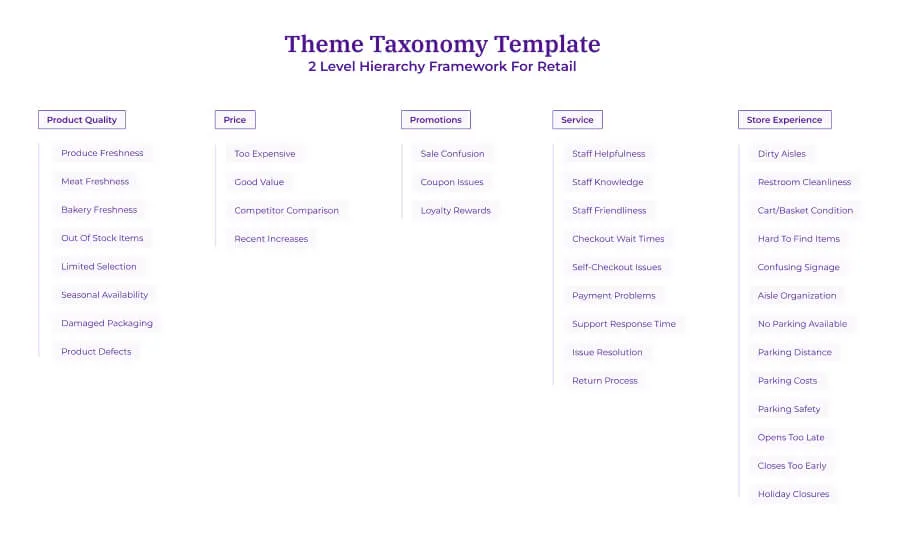
Use this framework to structure your themes for maximum clarity and actionability. This retail example demonstrates principles that apply to any industry.
Note: Thematic uses a two-level hierarchy (base theme → sub-theme), so this template is designed to work directly with the platform.
A retail-specific theme taxonomy organizing customer feedback into five parent themes and their related sub-themes, enabling structured analysis of product quality, pricing, promotions, service, and store experience feedback.
Example retail theme taxonomy
PRODUCT QUALITY
├── Produce freshness
├── Meat freshness
├── Bakery freshness
├── Out of stock items
├── Limited selection
├── Seasonal availability
├── Damaged packaging
└── Product defects
PRICE
├── Too expensive
├── Good value
├── Competitor comparison
└── Recent price increases
PROMOTIONS
├── Sale confusion
├── Coupon issues
└── Loyalty rewards
SERVICE
├── Staff helpfulness
├── Staff knowledge
├── Staff friendliness
├── Checkout wait times
├── Self-checkout issues
├── Payment problems
├── Support response time
├── Issue resolution
└── Return process
STORE EXPERIENCE
├── Floors or aisles dirty
├── Restrooms unclean
├── Carts or baskets dirty
├── Hard to find items
├── Aisles too narrow
├── Poor signage
├── No parking available
├── Parking far from entrance
├── Paid parking
├── Parking safety concerns
├── Should open earlier
├── Should stay open later
└── Closed on holidays
Try this now: Audit your current taxonomy
Export your existing theme list and score it against these five principles:
1. Is hierarchy depth exactly 2 levels? 2. Are names action-oriented (not just nouns)? 3. Do themes map to team ownership? 4. Are duplicates merged? 5. Are broad themes split where action differs?
If fewer than 3 pass, your taxonomy needs work before you can trust your prioritization.
Taxonomy design principles
Limit hierarchy depth to 2 levels: Base theme → Sub-theme. Thematic uses a two-level hierarchy, which keeps themes manageable and easy to report on. If you need more granularity, create more specific sub-themes rather than adding depth.
Use action-oriented naming: "Checkout wait times" is more actionable than "Checkout." Teams should immediately understand what the theme refers to and who owns it.
Match organizational structure: If different teams own different issues, your taxonomy should reflect that. The store operations team handles "Store cleanliness" while the digital team handles "App performance."
Merge when themes share root causes: If "Slow service" and "Long wait times" always appear together and have the same fix, merge them. Keep them separate when different teams need to address them.
Split when action differs: A broad "Pricing" theme is less useful than separating "Price" (too expensive, competitor comparison) from "Promotions" (coupon issues, sale confusion) because different teams typically own these areas and each requires a different response.
Your action item: Export your current theme list this week. Reorganize it using these five principles. You'll immediately see which themes need splitting, merging, or renaming.
Case study deep-dive: A large grocery retailer
The challenge A large grocery retailer we worked with was spending 7 days analyzing survey data through their existing platform. They weren't getting analysis results that enabled them to understand customer needs and what to act on.
What they'd tried before They were using Medallia to analyze survey data, but couldn't analyze organic comments and struggled to handle multiple datasets simultaneously. Revenue opportunities were slipping away during analysis delays.
Why they chose Thematic They needed bottom-up theme discovery from unstructured feedback, the ability to analyze multiple datasets at once, and significantly faster turnaround times.
What they discovered Department-specific impacts became clear. Fruit and Veg had -1.3 NPS impact, Meat had -0.9, and Bakery had -0.8. Being able to specifically attribute and explain results made it easy to double down on opportunities.
The results Analysis time reduced from 7 days to 5 hours (91% faster) $4.8M in annual revenue captured from customer-driven initiatives 4.75% business growth attributed to feedback-driven decisions 24 weeks of FTE time saved annually through 92% efficiency improvement
"Being able to specifically attribute and explain results made it easy to double down on opportunities."
How does AI handle feedback that mentions multiple topics?
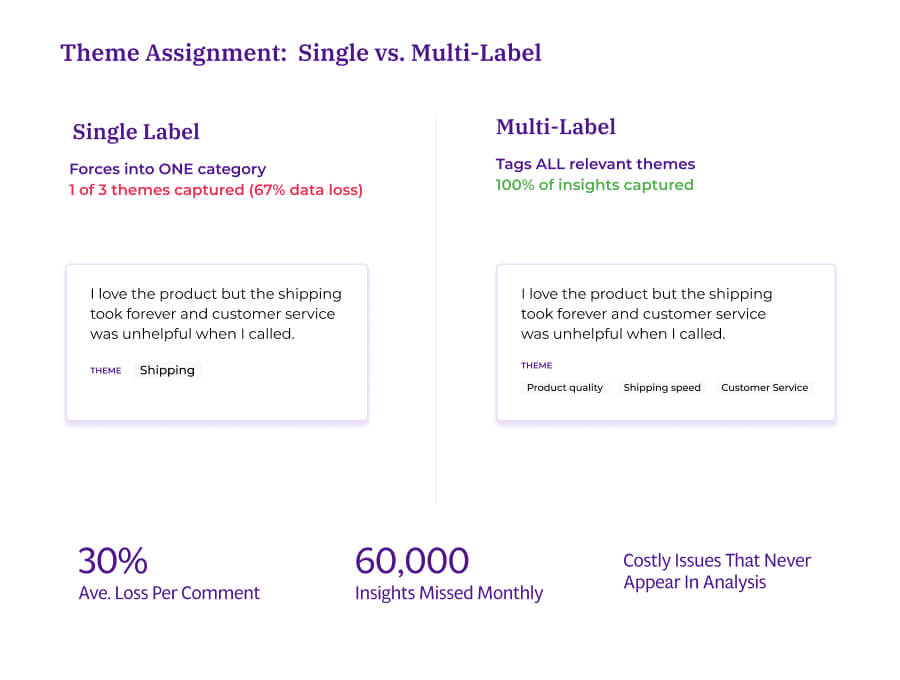
Thematic's customer feedback analytics platform handles complex feedback through multi-label assignment, tagging responses to multiple themes simultaneously. This ensures complete feedback capture without losing information.
A review mentioning both "pricing" and "customer service" gets tagged to both themes, not forced into one. This approach captures complete customer feedback without losing information.
Not all platforms support multi-label assignment. Single-label systems force each comment into one category, creating gaps in your data you'll never notice.
Why single-label systems fail
Consider this feedback: “The product works great and I'm really happy with it, but delivery took way longer than promised and when I contacted support about the delay, they weren't helpful at all."
A single-label system forces this into ONE category. If tagged as "Shipping," you completely lose the product praise and the customer service complaint.
A multi-label system tags to ALL relevant themes:
Product quality (positive sentiment)
Shipping speed (negative sentiment)
Customer service (negative sentiment)
Single-label systems lose up to 67% of insights per comment. Multi-label captures the complete picture.
The compounding cost of single-label systems
Single-label assignment creates invisible gaps. Issues that appear alongside other topics get underreported. They lose to the 'primary' theme every time, and the pattern compounds with every batch of feedback.
You miss patterns that only become visible when you track co-occurring themes. Thematic's "themes related to" feature reveals which issues appear together. This helps you discover, for example, that customers mentioning both "delivery delays" and "poor communication" show different churn patterns than those mentioning either issue alone.
These co-occurrence insights often point to systemic problems that single-theme analysis misses entirely.
At scale, miscategorization compounds. Single-label systems force each comment into one category, systematically undercounting issues that appear alongside other topics.
When feedback mentions multiple themes but only gets tagged to one, those secondary issues disappear from your analysis entirely, and the pattern repeats with every batch of feedback.
When evaluating AI theme discovery platforms, verify that multi-label assignment is standard, not optional.
Can I track how customer feedback themes change over time?
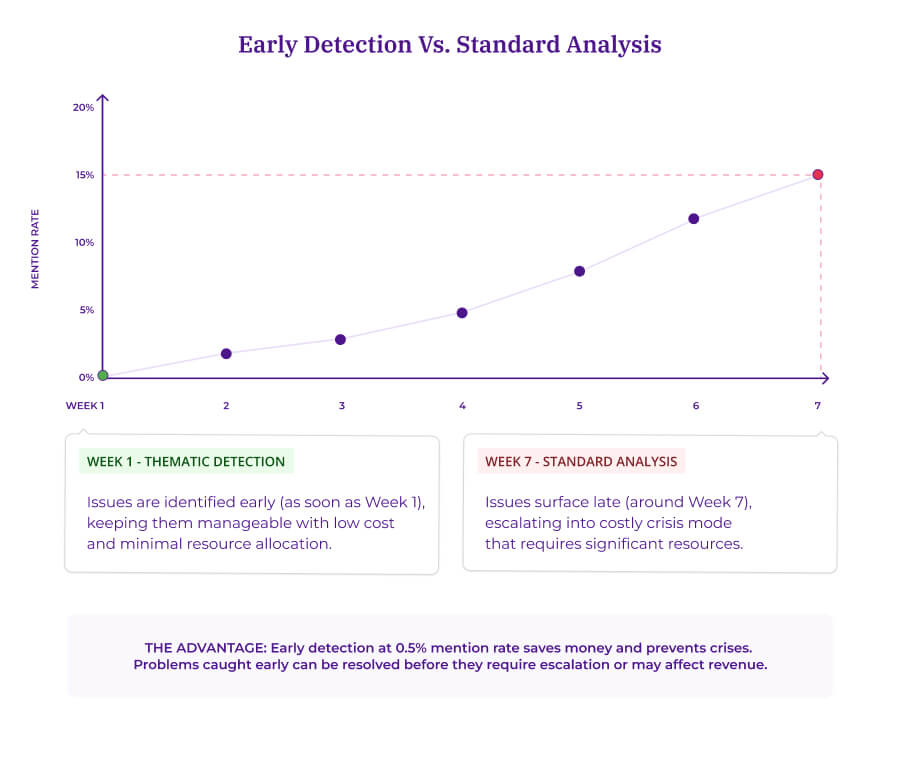
Customer Feedback Analytics platforms like Thematic track how themes emerge, grow, or decline over time, catching problems at 0.5% mention rate before they become 15% crises. This moves your team from reacting to problems to catching them early. You get decision-ready intelligence about what's getting worse and what's improving.
Static snapshots tell you what people said last month. Trend analysis tells you what's accelerating, what's stabilizing, and what new issues are surfacing.
How trend tracking works
Greyhound uses this trend tracking capability to catch issues as they develop, cutting their analysis time from weeks to minutes.
Automated trend tracking follows a consistent process:
The system analyzes incoming feedback against your existing theme structure
It calculates changes in frequency, sentiment, and business impact for each theme
Statistical tests flag movement that exceeds normal variation
New emerging themes surface automatically when patterns appear in the data
Catching problems early with emerging issue detection
Most analytics platforms only show you problems after they've grown large enough to appear in standard volume rankings. By then, you're in crisis mode.
Thematic's emerging issue detection catches problems at 0.5% mention rate before they become visible in standard analysis. The system analyzes the past six time periods to establish "normal" behavior for each theme, then automatically flags anything moving outside expected ranges.
Early detection at 0.5% mention rate catches issues before they escalate into costly crises.
This early detection saves money and prevents crises. Problems caught early require fewer resources to fix. Issues identified at 0.5% mention rate can often be resolved before they affect revenue or require executive escalation.
Toolkit: When to act on theme trends
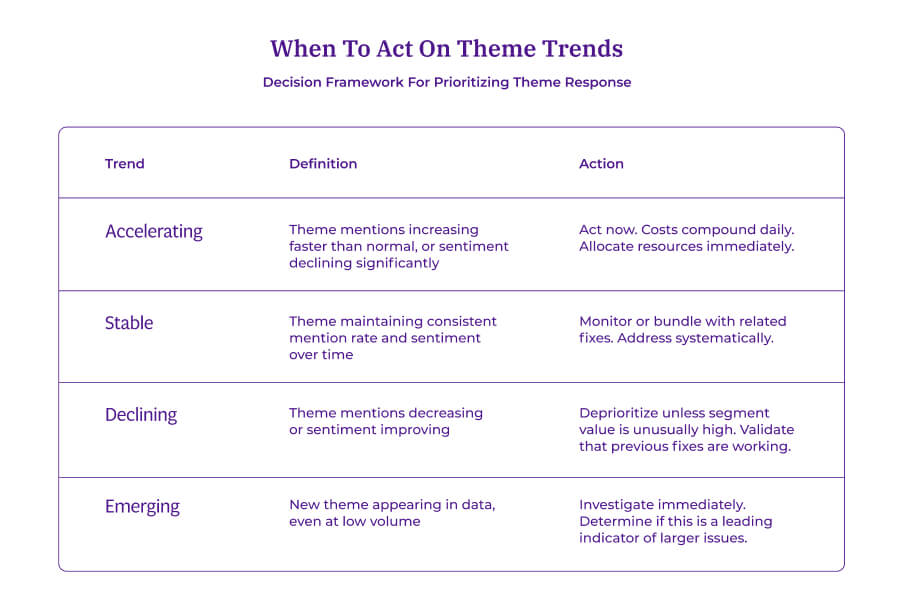
Use this framework to classify themes and determine response priority. Print this and reference it during your weekly analysis review.
Classify theme trends to determine the right response and resource allocation.
Trend type
Definition
Action
Accelerating
Theme mentions increasing faster than normal, or sentiment declining significantly
Theme maintaining consistent mention rate and sentiment over time
Monitor or bundle with related fixes. Address systematically.
Declining
Theme mentions decreasing or sentiment improving
Deprioritize unless segment value is unusually high. Validate that previous fixes are working.
Emerging
New theme appearing in data, even at low volume
Investigate immediately. Determine if this is a leading indicator of larger issues.
Time window guidance
Compare 30/60/90-day windows to identify patterns
Set minimum coverage thresholds (3-5%) to avoid chasing statistical noise
Weight recent data more heavily for fast-moving issues
Consider seasonality before flagging unusual movement
The acceleration principle
An accelerating issue with moderate impact deserves more attention than a declining issue with high impact. You're preventing future damage versus cleaning up past problems. The cost of early intervention is almost always lower than the cost of crisis response.
Case study deep-dive: Greyhound
The challenge Greyhound's Insights team was spending 3-4 weeks just compiling feedback reports. By the time their analysis reached decision-makers, the issues had already impacted revenue.
What they'd tried before Hiring more analysts wouldn't solve the speed problem. Manual processes simply couldn't scale, no matter how many people they threw at it.
Why they chose Thematic They needed immediate theme discovery with no training period. They wanted to spot trends as they developed, not weeks after the fact.
What they discovered Thematic surfaced insights that their manual process had completely missed, including positive driver feedback that had been buried in the data. And trend tracking showed them which issues were accelerating, so they could respond before problems grew.
The results Analysis time dropped from 3-4 weeks to just 10 minutes (99.7% faster) Three critical issues found that manual analysis had missed Real-time monitoring became possible for the first time The Insights team went from producing reports to providing strategic advice
"The over-time feature is always interesting to me, being able to view different themes over time and how they've improved or declined." — Matthew Schoolfield, Senior Customer Insights Analyst
How do I find the root cause of customer complaints?
Thematic's customer feedback analytics platform includes Impact Analysis, which calculates exactly how many NPS or CSAT points each theme costs you, revealing which issues actually drive customer behavior versus which ones just generate noise.
Why does this matter?
Because customers leave based on impact, but most teams prioritize by volume. A theme mentioned by 5% of customers might cost you more NPS points than one mentioned by 25%.
The impact formula
Thematic's Impact Analysis calculates:
Impact = Overall average NPS − Theme-specific average NPS
A theme with -3.2 impact means customers who mention that theme score you 3.2 points lower than your overall average. This quantifies exactly how much each issue costs you in customer loyalty.
Volume lies. Impact tells the truth.
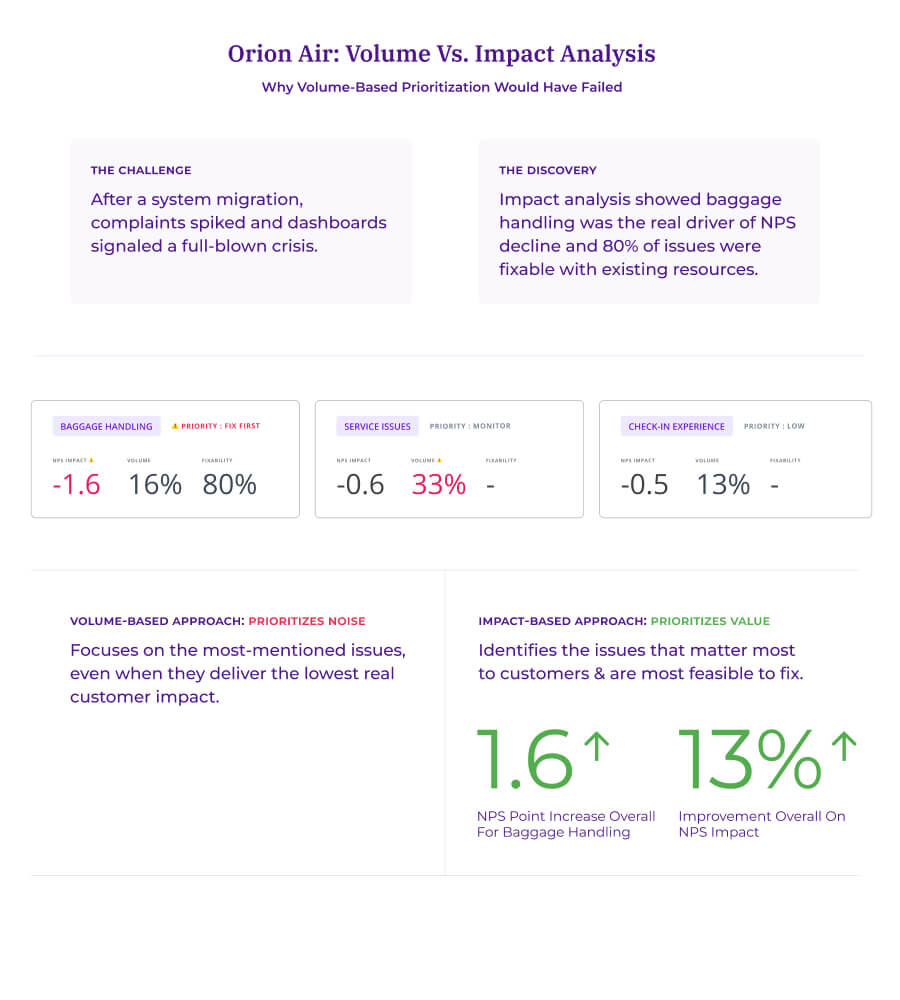
Orion Air discovered this gap after a system migration. Complaint volume surged. Service issues dominated every dashboard. Leadership mobilized resources for what looked like an obvious crisis.
When they ran impact analysis in Thematic, the findings surprised them.
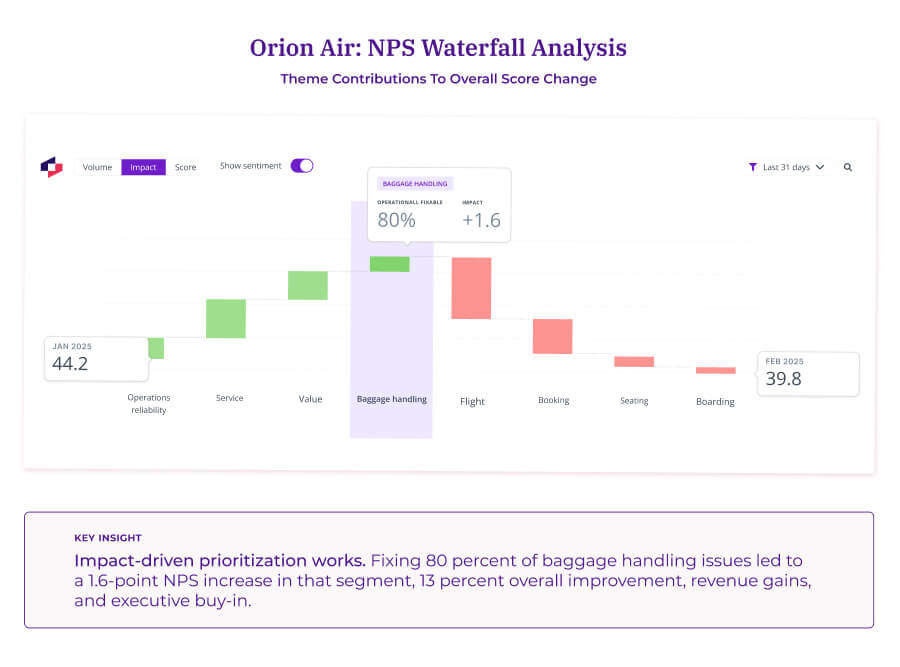
Baggage handling wasn't mentioned most frequently. But it had the biggest negative impact on NPS and customer lifetime value. And 80% of those issues were operationally fixable with existing resources.
Orion Air refocused. They fixed baggage handling first.
Theme
NPS Impact
Mention Rate
Fixability
Service issues
-0.6 pts
High
Mixed
Baggage handling
-1.6 pts
Moderate
80% operationally fixable
Check-in experience
-0.5 pts
Moderate
Mixed
Result: 1.6-point NPS increase in that segment, contributing to 13% overall NPS improvement.
The fix paid for itself in months. Without impact analysis, they would have spent resources on high-volume service complaints that barely moved their scores.
Baggage handling had 2.7x more impact than service issues despite lower volume, making it the highest-ROI fix. Priority starts where point drag meets fixability. Not where volume peaks.
Toolkit: The IST decision framework
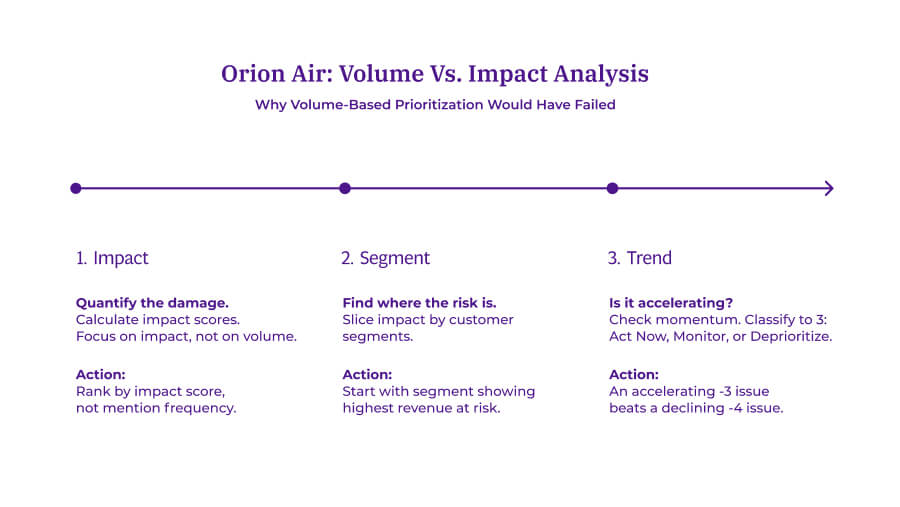
The IST framework prioritizes customer issues in three steps:
Impact (how much does it affect scores?),
Segment (which customers are affected?), and
Trend (is it getting worse?).
This sequence ensures you fix what matters to the customers who matter most.
When you identify an issue, follow this sequence: Impact → Segment → Trend. Use this framework to prepare executive presentations and align cross-functional teams on priorities.
The IST framework: prioritize customer issues by Impact, Segment, and Trend.
Step 1: Impact (quantify the damage)
Calculate impact scores for your top themes. Focus on themes with the highest negative impact, not the highest volume.
Key questions:
Which themes have the largest negative impact on NPS/CSAT?
How does impact compare to mention rate? (Look for high-impact, low-volume hidden issues)
What percentage of high-impact issues are operationally fixable?
Action: Run impact analysis on your top 20 themes. Rank by impact score, not mention frequency.
Step 2: Segment (find where risk concentrates)
Slice impact by customer segments to find where problems hit hardest.
Segment by:
Customer tier or plan (enterprise vs. SMB)
Lifecycle stage (new vs. long-tenure)
Region or market
Product line
Channel
The same theme might cost you -2 points overall but -8 points in high-value segments.
Segment
Impact
Coverage
Revenue at risk
Enterprise tier
-4.2 pts
12%
$2.1M
Mid-market
-2.8 pts
35%
$890K
Small business
-1.1 pts
53%
$340K
Action: Start with the segment showing highest revenue at risk, not highest coverage.
Step 3: Trend (is it accelerating?)
After sizing impact and locating risk, check momentum.
Classify each high-impact theme:
Accelerating: Act now. Issue is getting worse.
Stable: Monitor or bundle with related fixes.
Declining: Deprioritize unless segment value is unusually high.
Action: An issue with -3 impact that's accelerating beats a -4 issue that's declining. You're preventing future damage versus cleaning up past problems.
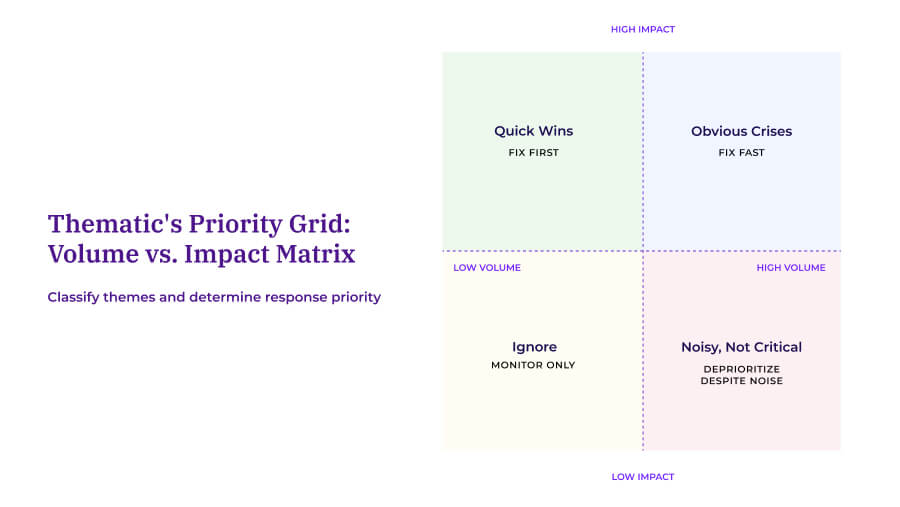
Toolkit: Volume vs. impact priority matrix
Use this 2x2 matrix to classify themes and determine action. This framework ends roadmap debates by providing objective prioritization criteria.
Use this priority matrix to classify themes and determine response urgency.
The hidden killers quadrant
This is where most teams miss opportunities. Low-volume themes with high impact often represent:
Problems affecting your most valuable customers
Issues that drive silent churn (customers leave without complaining loudly)
Operational problems with straightforward fixes
Orion Air's baggage handling issue lived in this quadrant. Low mention rate made it invisible in volume-based analysis. High impact made it the single biggest opportunity for NPS improvement.
Segment value: Revenue or LTV of affected customers
Effort: Time, cost, or complexity to fix
Present this matrix to executives. It transforms subjective debates into data-driven prioritization.
Case study deep-dive: Orion Air
The challenge A system migration triggered a flood of complaints. Service issues dominated every dashboard, and leadership wanted fast action. But the Insights team had a hunch that volume wasn't telling the whole story.
What they'd tried before Manual analysis of verbatims couldn't scale to the volume they were dealing with. Their existing survey platform's built-in analytics showed themes but couldn't connect them to business impact. Other feedback platforms they'd evaluated couldn't explain how they reached their conclusions.
Why they chose Thematic They needed transparent AI that showed its work, impact analysis that quantified real business outcomes, and outputs that executives would actually trust.
"What's needed is to make the customer experience feel real for commercial teams by linking NPS to financial results." — Insights Lead
What they discovered When they ran impact analysis, baggage handling jumped to the top. It wasn't mentioned most frequently, but it had the biggest NPS drag. And 80% of those issues were fixable with resources they already had.
The results 1.6-point NPS increase in the baggage handling segment 13% overall NPS improvement Measurable revenue gains from targeted fixes Executive buy-in because the analysis was transparent and defensible
"What's remarkable isn't just that we improved NPS. It's that we became more efficient. Thematic helped us invest smarter, not just more." — Insights Lead, Orion Air
Impact analysis reveals which themes actually move your scores, not just which get mentioned most.
Putting it all together
AI-powered theme discovery works. The technology matches human accuracy while processing feedback in minutes instead of weeks.
The Forrester Total Economic Impact study verified 543% ROI over 3 years for organizations using transparent, research-grade AI theming, with payback in under 6 months and $652,000 in annual savings from automated analysis.
The difference between platforms that drive decisions and platforms that gather dust comes down to six capabilities:
Capability
What to look for
Why it matters for executives
Transparency
See how themes are built; trace any insight to original comments
Defend conclusions in board presentations
Accuracy
80%+ out of the box with clear methodology
Trust the data enough to act on it
Customization
Refine themes to match your terminology without starting over
Align insights with organizational language
Multi-label handling
Capture all topics in complex feedback, not just the "primary" one
Complete picture of customer experience
Trend detection
Spot emerging issues at 0.5% mention rate
Prevent crises instead of reacting to them
Impact intelligence
See which themes drive scores, not just mention frequency
Prioritize fixes that actually move metrics
If a platform delivers all six, it's worth evaluating. If it fails on transparency or impact intelligence, it won't deliver decision-ready insights your executive team can act on.
How Thematic delivers as a customer feedback intelligence layer
Thematic serves as the AI-powered customer feedback analytics layer for enterprise CX and Insights teams, transforming scattered feedback into decision-ready intelligence.
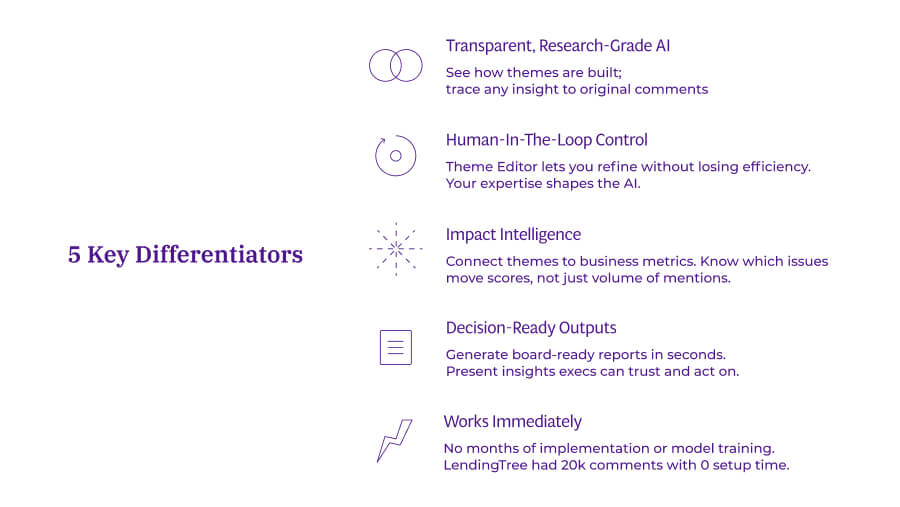
Rather than replacing your existing feedback collection systems (Medallia, Qualtrics, contact center platforms), Thematic sits on top of them. It applies research-grade AI to transform scattered feedback into decision-ready customer intelligence.
It matters because you don't need to rip and replace your current infrastructure. Thematic integrates with 100+ data sources and works immediately without months of implementation.
Five capabilities that separate decision-driving platforms from tools that gather dust.
Building your business case
Use these proof points when presenting to leadership:
ROI evidence:
543% ROI over 3 years (Forrester TEI Study)
$2.9 million in total benefits
Payback in under 6 months
$652,000 annual savings from automated analysis
4,250 hours of manual work eliminated annually
Speed evidence:
Greyhound: 3-4 weeks → 10 minutes (99.7% faster)
Large grocery retailer: 7 days → 5 hours (91% faster)
LendingTree: Zero setup time, immediate value
Analysis that took weeks now takes minutes
Outcome evidence:
Orion Air: 13% NPS improvement, 1.6-point recovery in key segment
Large grocery retailer: $4.8M annual revenue captured, 4.75% business growth
Teams move from reporting to strategic advising
Issues caught before they impact revenue
Your next steps
Ready to see Thematic's AI theme discovery in action?
Book a demo to see how the feedback intelligence layer works on your own data. We'll show you:
How Thematic discovers themes in your specific feedback
Which themes are actually driving your NPS or CSAT scores (impact, not just volume)
How the Theme Editor lets you customize without losing accuracy
What emerging issues might be hiding in your current data
Bring your toughest feedback dataset. We'll analyze it live and show you decision-ready insights your current platforms are missing.
Share
Link Copied!
Request a demo of Thematic's Customer Intelligence Platform
Thematic turns fragmented feedback into one consistent source of customer truth — so every team acts on the same customer story. Up and running in days, not quarters.
Thank you! Your submission has been received!
Oops! Something went wrong while submitting the form.